Adaptor: The Ultimate Guide to Types, Features, Advantages, and Technical Insights
What Is an Adaptor?
An adaptor (also spelled “adapter”) is a device or accessory designed to convert one type of connection, power input, or size into another—enabling compatibility between two otherwise incompatible items. Unlike cables (which only extend or transfer signals), adaptors actively modify inputs/outputs, voltages, or physical connections. They’re used across industries and daily life, from electronics and travel to construction and home appliances. For example:
- A travel power adaptor converts a country’s unique electrical plug shape to fit your phone charger.
- A USB-C to HDMI adaptor lets you connect a modern laptop to an older monitor with an HDMI port.
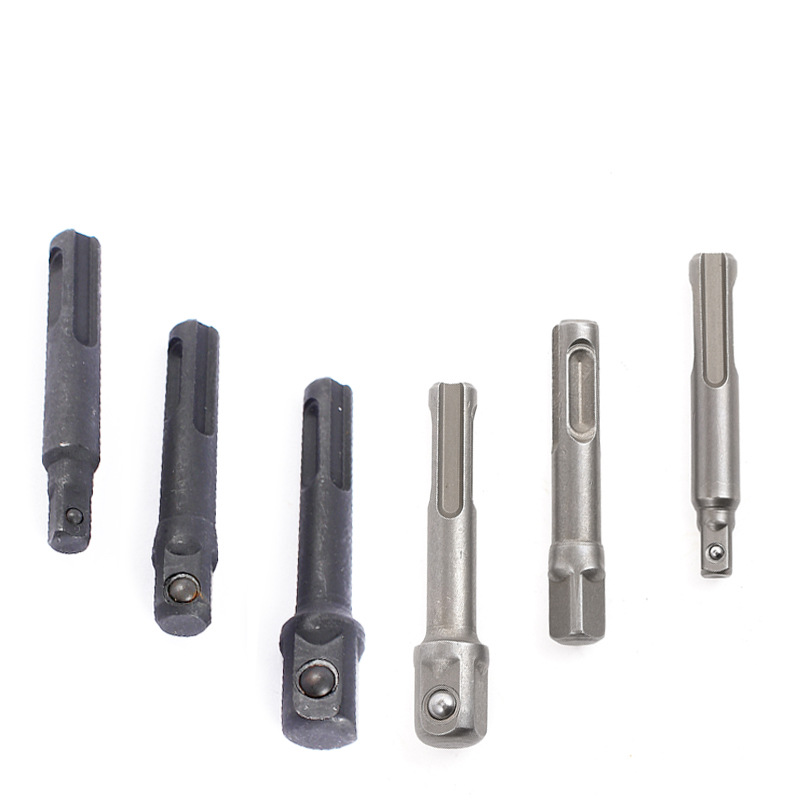
- A drill bit adaptor allows a 1/4-inch hex bit to fit a 3/8-inch chuck drill.
Adaptors come in compact, portable designs for on-the-go use and sturdier, fixed models for permanent setups (like home theater systems or workshop tools).
Common Types of Adaptors (by Use Case)
Understanding the different types of adaptors helps you choose the right one for your needs. Here are the most widely used categories:
1. Power Adaptors (Electrical)
These adaptors handle electricity-related incompatibilities, critical for safe device operation:
- Travel Plug Adaptors: Convert plug shapes to match regional electrical outlets (e.g., Type A for the US, Type G for the UK). Note: Most only change plug shape—they don’t convert voltage (for that, you need a voltage converter).
- AC/DC Adaptors (Power Bricks): Convert alternating current (AC) from wall outlets to direct current (DC) for devices like laptops, routers, or small appliances. They’re often branded with “input” (wall power) and “output” (device power) specs.
- USB Adaptors: Convert USB ports to other power types (e.g., USB-A to USB-C, USB to AC plug) for charging multiple devices.
2. Data/Connection Adaptors
These focus on transferring data or signals between devices with different ports:
- Audio/Video Adaptors: Examples include HDMI to DisplayPort, USB-C to VGA, or 3.5mm audio jack to Bluetooth—ideal for connecting phones, laptops, or gaming consoles to TVs, speakers, or projectors.
- Network Adaptors: Convert wired Ethernet to Wi-Fi (wireless adaptors) or vice versa, helping devices without built-in Wi-Fi (like old desktop computers) connect to the internet.
- Peripheral Adaptors: Connect legacy peripherals to modern devices (e.g., USB-A to PS/2 for old keyboards, USB-C to Ethernet for laptops without Ethernet ports).
3. Tool Adaptors
For DIYers and professionals, these adaptors expand the functionality of tools:
- Drill Bit Adaptors: Let drills use bits of different shank sizes (e.g., 1/4-inch to 3/8-inch) or types (e.g., hex to round).
- Socket Adaptors: Convert socket wrench sizes (e.g., 1/2-inch drive to 3/8-inch drive) to fit different bolts or nuts.
- Saw Blade Adaptors: Allow circular saws to use blades with different arbor hole sizes (the center hole that attaches to the saw).
Key Features of a High-Quality Adaptor
Not all adaptors are reliable—poorly made ones can damage devices, cause power surges, or fail quickly. Look for these must-have features:
1. Durable Construction
Adaptors endure frequent handling (e.g., plugging/unplugging, travel), so durability matters:
- Housing Materials: High-grade plastics (e.g., ABS, polycarbonate) resist cracks, heat, and impact. Metal housings (aluminum, stainless steel) are better for heavy-duty use (e.g., tool adaptors or industrial power adaptors).
- Reinforced Cables (for Wired Adaptors): Braided nylon or rubberized cables prevent fraying at the connector—critical for adaptors you carry in bags (like USB-C to HDMI adaptors).
- Gold-Plated Connectors: Reduce corrosion and improve signal/power transfer. Gold-plated USB or HDMI connectors last longer and deliver clearer audio/video or faster charging.
2. Safety Certifications
Electrical adaptors pose fire or shock risks if uncertified. Look for labels from trusted organizations:
- UL (Underwriters Laboratories): For North American adaptors—ensures compliance with safety standards.
- CE (Conformité Européenne): Required for adaptors sold in the EU—verifies they meet health, safety, and environmental standards.
- RoHS (Restriction of Hazardous Substances): Ensures the adaptor doesn’t contain harmful materials like lead or mercury.
- Overload/Overheat Protection: Built-in fuses or circuit breakers shut off power if the adaptor exceeds safe voltage or current levels—prevents damage to your devices.
3. Compatibility and Versatility
A good adaptor should work with your specific devices and, ideally, future ones:
- Clear Compatibility Labeling: Look for markings like “USB-C to HDMI 4K@60Hz” or “100-240V AC Input” to confirm it works with your device (e.g., a 4K TV or international power).
- Multi-Functional Designs: Some adaptors combine multiple ports (e.g., a USB-C hub with HDMI, USB-A, and Ethernet ports) to replace multiple single-use adaptors.
- Universal Fit: For travel adaptors, choose models that work in multiple countries (e.g., 4-in-1 adaptors for US, EU, UK, and AU plugs) instead of single-region ones.
4. Compact and Portable (for On-the-Go Use)
Travel or daily-use adaptors should be easy to carry:
- Slim Profile: Thin, lightweight designs (e.g., USB-C to USB-A adaptors) fit in pockets or laptop bags without adding bulk.
- Foldable Plugs: Travel power adaptors with foldable prongs prevent scratches to other items in your bag.
Advantages of Using a High-Quality Adaptor
Investing in a reliable adaptor offers far more than just compatibility—it solves practical problems and protects your devices:
1. Extends the Life of Your Devices
Instead of replacing an old but functional device (e.g., a 3.5mm speaker or a laptop with a broken DC port), an adaptor lets you use it with new systems. For example:
- A USB-C to 3.5mm adaptor lets you use your old headphones with a new phone that lacks a headphone jack.
- A DC power adaptor with a replaceable tip can power multiple devices (e.g., a router and a portable fan) if their original power bricks break.
2. Saves Money
Adaptors are cheaper than buying new devices or tools. For instance:
- A
20USB−CtoHDMIadaptorisfarmoreaffordablethana
300 new monitor with a USB-C port.
- A $15 drill bit adaptor lets you use your existing bit collection with a new drill, avoiding the cost of buying all new bits.
3. Enhances Convenience and Flexibility
Adaptors eliminate “compatibility stress” in daily life:
- Travelers can charge phones, laptops, and cameras in any country with a single universal adaptor—no need to pack multiple plugs.
- Home users can connect a mix of old and new devices (e.g., a vintage record player to a modern soundbar) without rewiring or buying new equipment.
- Professionals (e.g., photographers, contractors) can use their tools and devices in different workspaces—whether it’s a job site with 240V power or a client’s office with only USB ports.
4. Ensures Safe Operation
Certified adaptors prevent electrical damage:
- AC/DC adaptors with voltage regulation protect sensitive devices (e.g., cameras, laptops) from power surges or fluctuations.
- Tool adaptors with secure locking mechanisms (e.g., a drill bit adaptor with a hex lock) prevent bits from slipping during use—reducing the risk of injury or damage to workpieces.
Technical Information: What to Look for in Specs
Understanding adaptor specs helps you avoid mismatches and ensure optimal performance. Here are the key technical details to check:
1. Power Adaptor Specs (Voltage, Current, Wattage)
For electrical adaptors, these three specs are critical—mismatched values can destroy your device:
- Input Voltage: The range of AC voltage the adaptor can accept (e.g., “100-240V ~50/60Hz”). A wide range is best for travel, as it works in both 110V (US) and 220V (EU) regions.
- Output Voltage (V): The DC voltage the adaptor delivers to your device (e.g., “19.5V”). This must match your device’s required voltage exactly (e.g., a 12V device can’t use a 19.5V adaptor).
- Output Current (A): The maximum current the adaptor can supply (e.g., “3.33A”). The adaptor’s current should be equal to or higher than your device’s required current (e.g., a device needing 2A works with a 3.33A adaptor, but not vice versa).
- Wattage (W): Calculated as Voltage × Current (e.g., 19.5V × 3.33A = 65W). Ensure the adaptor’s wattage meets or exceeds your device’s wattage (critical for high-power devices like laptops).
2. Data/Connection Adaptor Specs (Speed, Resolution, Bandwidth)
For audio/video or network adaptors, these specs determine performance:
- Video Resolution/Refresh Rate: HDMI adaptors may specify “4K@60Hz” or “1080p@30Hz”—higher values mean sharper, smoother video (important for gaming or 4K TVs).
- Data Transfer Speed: USB adaptors list speeds like “USB 3.2 Gen 1 (5Gbps)” or “USB 2.0 (480Mbps)”—faster speeds reduce file transfer time (e.g., moving photos from a camera to a laptop).
- Audio Format Support: Audio adaptors may support “Dolby Atmos” or “Hi-Res Audio”—critical for home theater setups or audiophiles.
3. Tool Adaptor Specs (Size, Compatibility)
Tool adaptors rely on precise measurements to fit securely:
- Shank/Drive Size: For drill bit adaptors, this refers to the input (drill chuck size) and output (bit shank size) (e.g., “3/8-inch drive to 1/4-inch hex”).
- Arbor Size: For saw blade adaptors, this is the diameter of the center hole (e.g., “5/8-inch arbor to 1/2-inch arbor”)—must match both the saw and the blade.
- Torque Rating: Heavy-duty tool adaptors list a torque limit (e.g., “200 ft-lbs”)—exceeding this can break the adaptor or damage the tool.
How to Choose the Right Adaptor for You
Follow these steps to select an adaptor that fits your needs and avoids mistakes:
- Identify Your Problem: What incompatibility are you solving?
- Need to charge a laptop abroad? Choose a travel adaptor (plus a voltage converter if the laptop’s power brick isn’t 100-240V).
- Want to connect a phone to a TV? Pick a USB-C to HDMI adaptor (ensure it supports your TV’s resolution).
- Need to use old drill bits with a new drill? Get a drill bit adaptor that matches your drill’s chuck size and bit shank size.
- Check Device Specs:
- For electrical devices: Find the “input voltage” and “current” on the device or its original power brick (e.g., “12V DC, 2A”).
- For data devices: Note the port types (e.g., “USB-C laptop, HDMI TV”) and performance needs (e.g., “4K video”).
- Prioritize Safety and Quality:
- Avoid cheap, uncertified adaptors (they may lack surge protection or use low-quality materials).
- Choose adaptors from trusted brands (e.g., Anker for USB adaptors, Belkin for travel adaptors, DeWalt for tool adaptors).
- Consider Versatility:
- If you travel often, a universal travel adaptor is better than single-region ones.
- For home use, a multi-port USB hub (with HDMI, USB-A, and Ethernet) replaces multiple single-use adaptors.
Post time: Nov-02-2025